Prepare Black Friday email campaigns and automations
Prepare eligible audiences, useful campaigns and working automations.
Prepare the audience and the sending setup
Before planning a send count, establish who may receive the message and whether the sending setup is healthy.
UK permission: make the distinction
For unsolicited marketing email or SMS to individual subscribers, use valid consent or meet every condition of the products/services soft opt-in: you obtained the details during a sale or genuine sale negotiation, promote your own similar products, offered an opt-out when collecting the details and include one in each message. Sole traders and some partnerships count as individuals. 23
A visit, comment, guide download or recovery event alone is not blanket marketing permission. Keep email and SMS choices separate, retain records and honour suppression. A specifically requested message has a different scope from an ongoing promotional sequence. 23
Sending setup: require evidence
For Gmail bulk sending, check SPF, DKIM, DMARC alignment, TLS, one-click unsubscribe and a visible body unsubscribe link with your provider. Gmail requires reported spam rates below 0.3%; that is a ceiling, not a safe target to aim at. These conditions are not a complete checklist for every mailbox provider. 22
| Audience | Treatment to consider |
|---|---|
| Engaged prospects | Relevant proof and the live offer. Define engagement using clicks, visits and purchases alongside delivery signals. |
| Customers and VIPs | Relevant benefits, product ownership and meaningful access. |
| Recent buyers / open service issues | Change the message for recent buyers and customers waiting for help; suppress inappropriate promotion. |
| Dormant contacts | Review eligibility and history. Do not reactivate a cold database in a sudden peak blast. |
Recommendation. Review bounces, complaints and suppressions before raising volume. Opens alone are unreliable. Use your platform diagnostics and mailbox requirements; a test email arriving in your own inbox is insufficient.
An example campaign calendar
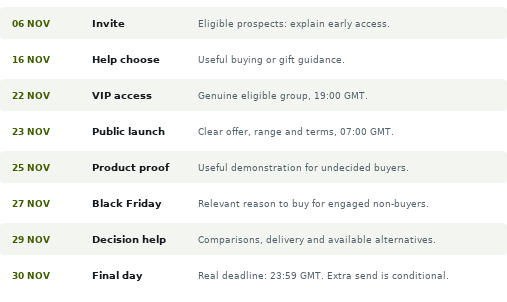
Illustrative plan for one offer opening publicly on 23 November and ending on 30 November at 23:59 GMT.
One offer, several useful reasons to revisit
Read the chart as text
- 06 NOV · Invite · Eligible prospects: explain early access.
- 16 NOV · Help choose · Useful buying or gift guidance.
- 22 NOV · VIP access · Genuine eligible group, 19:00 GMT.
- 23 NOV · Public launch · Clear offer, range and terms, 07:00 GMT.
- 25 NOV · Product proof · Useful demonstration for undecided buyers.
- 27 NOV · Black Friday · Relevant reason to buy for engaged non-buyers.
- 29 NOV · Decision help · Comparisons, delivery and available alternatives.
- 30 NOV · Final day · Real deadline: 23:59 GMT. Extra send is conditional.
Illustrative schedule: VIP 22 November 19:00 GMT; public 23 November 07:00; end 30 November 23:59. Use current permission, exclusions and frequency rules at each send.
Adapt this sequence to buying cycle, permission and account health. Apply exclusions at send time. Keep broadcasts, SMS, ads, social and flows on one calendar, with live stock, offer expiry and time zones checked. Measure delivery, clicks, orders, revenue per delivered recipient, unsubscribes and complaints using consistent attribution windows.
Frequency is a decision. Do not disable all frequency protection for peak. Klaviyo Smart Sending can skip a message; it does not automatically reschedule it. Inspect each message and test delivery of the sign-up promise separately from optional promotion. 39
Check your automated emails before the sale
Start with what customers actually do. A long list of flows does not tell you whether they work.
An example checkout-recovery route
Read the chart as text
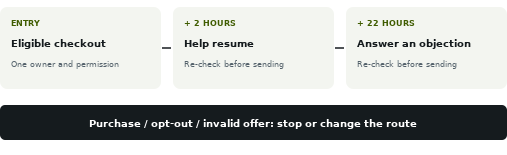
- ENTRY · + 2 HOURS · + 22 HOURS
- Eligible checkout · Help resume · Answer an objection
- One owner and permission · Re-check before sending · Re-check before sending
- Purchase / opt-out / invalid offer: stop or change the route
Illustrative recipe, not a universal Klaviyo template. Example waits of 2 hours and 22 further hours must fit permission, event reliability, product consideration and frequency controls.
| Decision | Example treatment |
|---|---|
| Entry | Checkout started; eligible email address; permission checked; one recovery platform owns the route. |
| Before every send | Re-check relevant purchase, suppression, live price, variant availability, expiry and service status. |
| Message 1 | Help resume checkout. Link to the right basket; explain the existing offer. Do not automatically add a discount. |
| Message 2 | Answer a likely objection, only if still relevant and within frequency rules. |
| Exit | Purchase, opt-out, expiry or invalid product/offer stops or changes the route. |
Welcome delivers the exact sign-up promise. Browse recovery needs identification and permission. Back-in-stock must use the requested variant; price-drop needs a real price change. Prevent overlapping Shopify, ESP and app recovery. 39
What I’d check first. I’d test a new eligible visitor, an ineligible visitor, a purchaser, an unsubscribe, a sell-out and a sale ending during the wait. Check event arrival and every email, not just the flow diagram.
Sources for this chapter
- [22] Gmail: Sender requirements
- [23] ICO: Electronic marketing rules
- [24] Klaviyo: Campaign timing and flows
- [25] Klaviyo: UK BFCM toolkit
- [39] Klaviyo: Smart Sending and skipped messages
Source review: 23 October 2026. Check current settings and availability before launch. The worked examples are illustrative, not client performance.
Put the plan to work
Use the PDF and editable workbook to assign the unfinished work. Enter your email in the download panel to get both files. Ongoing advice emails are optional.
Get the Black Friday guide and workbook
A 36-page PDF and an 11-tab Excel workbook to plan the offer, campaigns, stock, store checks and customer follow-up.
Development mock: nothing was sent to Klaviyo and no request was recorded.
Your downloads are ready.
Download the guide and workbook below. Start with the twelve checks, then add the unfinished work to the Actions tab.