Get the Shopify purchase journey ready for Black Friday
Make it easy to understand the offer and complete an order.
Make the shopping journey easy to follow
A customer arriving from an advert needs to understand the offer, find a relevant product and keep moving.
Homepage and collections
- Use a clear sale message with the actual benefit, dates and relevant exclusions.
- Link to the promoted range rather than relying on a general homepage banner.
- Put available, relevant products where shoppers can find them. Check collection sorting on mobile.
- Offer useful filters for a large range, with understandable labels and a clear way to remove them.
- Test search with brand names, common terms, misspellings and questions customers actually use.
- Check empty searches and sold-out products have a useful next step.
Keep navigation and calls to action readable on a phone. Dismissed overlays should stay dismissed for an appropriate period. Avoid covering product information or the purchase button with chat, pop-ups, sticky banners and delivery messages competing for the same space.
Find the slow or unstable pages
Check real mobile experience and the performance data available for important templates. Google’s good Core Web Vitals thresholds are LCP at or below 2.5 seconds, INP at or below 200 milliseconds and CLS at or below 0.1, assessed at the 75th percentile. Use these as diagnostic thresholds alongside the actual buying journey. 18
Compress large images appropriately, reserve image space and remove redundant scripts or unused app features. Check with the theme or app owner before removing a dependency. Compare after the change on the same page and device conditions.
Usability check. Ask someone unfamiliar with the store to find a suitable product and explain the offer without help. Record the point where they hesitate.
Sticky buttons, urgency messages, quizzes, pop-ups and trust badges are hypotheses rather than universal conversion improvements. Introduce them only to solve an observed problem and check accessibility, performance and the complete mobile journey.
Answer the questions that stop the order
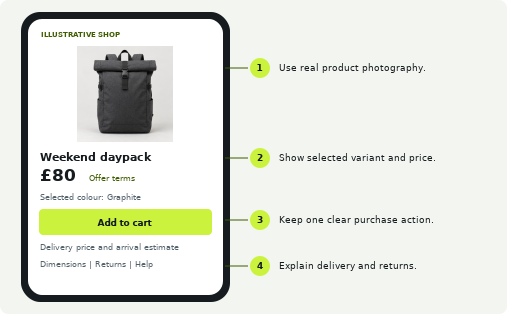
Put the buying decision beside the purchase action. This is an illustrative layout, not a Shopify screenshot.
A mobile product page that answers the next question
Read the chart as text
- ILLUSTRATIVE SHOP
- 1 · Use real product photography.
- Weekend daypack · 2 · Show selected variant and price.
- £80 · Offer terms
- Selected colour: Graphite
- Add to cart · 3 · Keep one clear purchase action.
- Delivery price and arrival estimate
- Dimensions | Returns | Help · 4 · Explain delivery and returns.
Fictional store and product information. Original layout diagram with AI-generated illustrative photography. No customer review, merchant result or tested conversion lift is implied.
- Show the actual selected variant, current price and a defensible saving.
- Place useful dimensions, compatibility and stock information where they affect choice.
- Explain delivery price and realistic arrival expectations before payment.
- Keep returns and the route to help close to the decision.
- Test contrast, keyboard focus, labels and errors. A sticky button must not cover choices.
Recommendation. Use your real product photographs and genuine reviews. Check whether customer questions and journey evidence justify the changes; do not copy the layout mechanically.
Show the cost and make payment work
Unexpected costs and unclear delivery can undo the work of a good advert and product page.
Baymard’s research identifies extra costs, delivery concerns and checkout friction among reasons people abandon purchases. Use this to focus investigation; the findings are not a forecast of your store’s conversion lift. 17
- The customer sees the live price, saving and expected delivery cost before payment.
- Automatic discounts and entered codes behave as the promotion brief says.
- The free-delivery threshold uses the intended basket value and responds to item changes.
- Guest purchase is available through the intended customer journey.
- Relevant payment options work on eligible devices, including accelerated checkout if enabled.
- Errors explain what needs changing without deleting the customer’s useful input.
- Mobile purchase controls are easy to reach and do not move unexpectedly.
- Confirmation, order details and the customer’s support route are clear.
Test the full payment path
Use the devices and payment methods your customers use. Check a normal card route and available wallets or accelerated methods. An accelerated route can differ from the standard cart experience, so verify discount, delivery and address behaviour separately.
Shopify checkout UI extensions on the information, shipping and payment pages require Plus. Other surfaces and public Functions apps have different availability. A theme edit cannot freely rearrange the standard checkout. Check the exact feature and plan before buying an app. 19
What I’d check first. I’d place a mobile order with the actual offer and delivery option. Record the charged total, confirmation, inventory change and tracking event. Reconcile and refund any live test order normally, and exclude it from performance reporting.
Rehearse the problems before launch
A small set of practical scenarios is more useful than assuming the team will work it out on the day.
| Scenario | What the team must know |
|---|---|
| A code removes the automatic saving | Which offer should apply, how to explain it and who can fix the configuration. |
| A promoted variant sells out | How to correct recommendations, destination and campaigns, and what to offer waiting customers. |
| Express is unavailable for a postcode | The accurate alternative and which promise needs changing. |
| An order is delayed or lost | The investigation route, customer update and resolution authority. |
| A customer requests a change | Whether the order is still editable and how to avoid a warehouse mismatch. |
Prepare answers and ownership
Keep current promotion terms, shipping information, product FAQs and returns instructions in one maintained place. Give staff reusable answers they can adapt. Set response expectations that match staffing, and route work by urgency, complexity and customer impact.
If AI answers questions or acts on orders, test it against the actual policies and live data. Define what it may change, when it must escalate and how a person receives the context. Check a sample of conversations before and during peak. Advanced automation is useful only when it handles the intended job accurately.
Use questions to find faults
Record recurring issues and changes from normal volumes. A cluster of discount complaints should prompt a check of the offer; delivery enquiries may need a warehouse or carrier investigation. Name the owner and confirm whether the fix reached the customer-facing information. Gorgias’s guides provide useful operational background. 30 31
Close the loop. A fixed setting is only part of the job. Update support replies, affected customers and any advert or page that still carries the wrong promise.
Separate a real fault from a small sample
Fix broken journeys immediately. Require stronger evidence before declaring a conversion winner.
Use the funnel to choose what to investigate
Read the chart as text
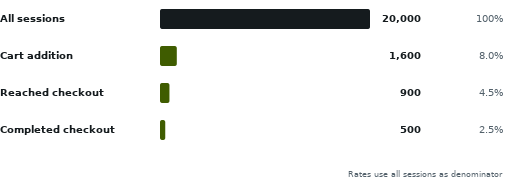
- All sessions · 20,000 · 100%
- Cart addition · 1,600 · 8.0%
- Reached checkout · 900 · 4.5%
- Completed checkout · 500 · 2.5%
- Rates use all sessions as denominator
Illustrative closed funnel for one period: 20,000 sessions, 1,600 with a cart addition, 900 reaching checkout and 500 completing checkout. Not an industry benchmark. 35
Here, 500 / 20,000 = 2.5% session conversion. Of the 900 sessions reaching checkout, 400 did not complete: 44.4%. That identifies a place to inspect, not proof that checkout caused every loss. Compare the same device, channel mix and funnel definition.
Don’t call a winner on two orders
Two orders from 100 visits and 200 from 10,000 both give a 2% rate. The first result is much less certain. For readers comparing the numbers: approximate 95% Wilson intervals are 0.6%-7.0% and 1.7%-2.3%. These assume independent trials and a stable rate, which real seasonal traffic may not provide.
Recommendation. Before an A/B test, set the metric, minimum worthwhile effect, sample plan and stopping rule. Include contribution, refunds and service outcomes. If volume cannot support a credible test, use observed faults and customer research, then treat the rollout result as directional.
Sources for this chapter
- [17] Baymard Institute: Checkout abandonment research
- [18] Google web.dev: Core Web Vitals
- [19] Shopify: Checkout app availability
- [30] Gorgias: Customer experience checklist
- [31] Gorgias: Enterprise BFCM playbook
- [35] Shopify: Online store conversion definitions
Source review: 23 October 2026. Check current settings and availability before launch. The worked examples are illustrative, not client performance.
Put the plan to work
Use the PDF and editable workbook to assign the unfinished work. Enter your email in the download panel to get both files. Ongoing advice emails are optional.
Get the Black Friday guide and workbook
A 36-page PDF and an 11-tab Excel workbook to plan the offer, campaigns, stock, store checks and customer follow-up.
Development mock: nothing was sent to Klaviyo and no request was recorded.
Your downloads are ready.
Download the guide and workbook below. Start with the twelve checks, then add the unfinished work to the Actions tab.