Plan the Black Friday offer and trading targets
Check the margin, agree the offer and give every job an owner.
Your five week countdown
Work backwards from 27 November. Dates below are a practical sequence for a store starting on 23 October.
The work that must be finished each week
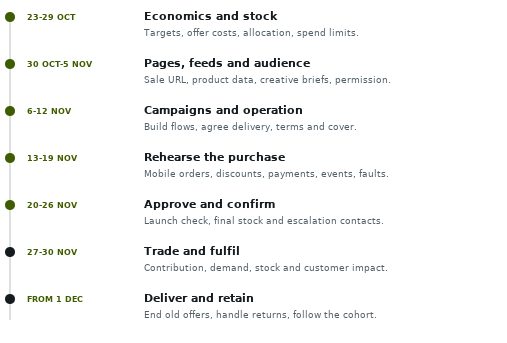
Read the chart as text
- 23-29 OCT · Economics and stock
- Targets, offer costs, allocation, spend limits.
- 30 OCT-5 NOV · Pages, feeds and audience
- Sale URL, product data, creative briefs, permission.
- 6-12 NOV · Campaigns and operation
- Build flows, agree delivery, terms and cover.
- 13-19 NOV · Rehearse the purchase
- Mobile orders, discounts, payments, events, faults.
- 20-26 NOV · Approve and confirm
- Launch check, final stock and escalation contacts.
- 27-30 NOV · Trade and fulfil
- Contribution, demand, stock and customer impact.
- FROM 1 DEC · Deliver and retain
- End old offers, handle returns, follow the cohort.
Planning sequence from 23 October 2026. Dates are recommended deadlines, not platform requirements.
If you have only seven days
Choose one clear offer on available stock. Use established traffic sources and your healthy, eligible email audience. Test the mobile destination, discounts, payment, delivery and essential flows. Name the person who can fix a fault.
Define done. Every campaign has an approved offer, audience, destination, stock position, owner and end time. Freeze avoidable major changes after the rehearsal, while still fixing confirmed faults.
Set the target before the discount
Revenue is useful only when you know what is left after the costs of earning and fulfilling the order.
Set a net sales target, contribution target, new customer target and maximum media spend. Compare with your normal trading and last peak period, if available. Check whether any apparent uplift simply brings December purchases forward or discounts orders that would have happened anyway.
Calculate contribution per order
Start with the customer payment after discount. For a VAT-registered business, separate VAT using the applicable rates. Add net shipping income, then deduct product cost, payment fees, picking and packing, carrier cost and a realistic allowance for returns or other variable costs. This gives contribution before advertising. Deduct media cost to see what remains before fixed overhead.
Costs should use a consistent VAT basis. A non-registered business should include irrecoverable VAT in its costs. Mixed VAT rates and complex returns need a more detailed calculation than the single-rate worked example here.
Keep cost per order and customer acquisition cost separate. An allowable media cost per order is an order-level planning limit. First-order CAC uses new customers and their first-order economics. Do not apply the example ROAS to every campaign or treat returning-customer sales as newly acquired customers.
| Decision | What to agree |
|---|---|
| Minimum contribution | The amount each order should leave after media. |
| Allowable acquisition cost | Contribution before media less the minimum you want to retain. |
| Budget boundary | What you can afford to spend while orders, returns and payouts settle. |
| Repeat purchase investment | Any deliberate first-order shortfall, supported by actual cohort evidence. |
What I’d check first. I’d check that the sales target and ad reports use the same revenue basis. A ROAS including VAT cannot be compared directly with an ex-VAT target. Record how shipping, returns and existing customers are treated.
What a deeper discount really costs
Illustrative example: a £100 basket, free delivery and a single 20% VAT rate.
A deeper discount cuts the money available for media
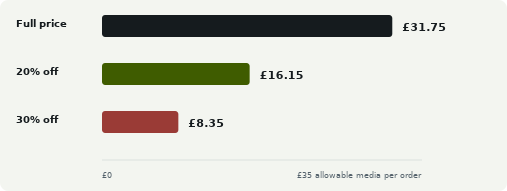
Read the chart as text
- Full price
- £31.75
- 20% off
- £16.15
- 30% off
- £8.35
- £0 · £35 allowable media per order
Illustrative model, not merchant results. £100 basket inc VAT; free delivery; 20% VAT; £28 goods; £8 fulfilment; fees 2% + 25p; returns allowance 4% of net revenue.
| Per order | Full price | 20% off | 30% off |
|---|---|---|---|
| Customer payment inc VAT | £100.00 | £80.00 | £70.00 |
| Contribution before media | £41.75 | £26.15 | £18.35 |
| Amount retained after media | £10.00 | £10.00 | £10.00 |
| Allowable media per order | £31.75 | £16.15 | £8.35 |
| Required payment/media ratio | 3.15x | 4.95x | 8.38x |
At £18 media cost per order, the 20% offer leaves £8.15 and the 30% offer leaves £0.35 before fixed overhead. To match full-price total contribution before media, the offers would need about 60% and 128% more orders respectively, assuming the same basket and costs.
Use the model correctly. The ratios use customer payment including VAT. They are not universal ad-platform targets. The returns reserve is simplified, fixed costs are excluded and a deeper discount does not guarantee extra demand. Replace all inputs in Offer Calc.
Choose the offer that fits the job
An offer should solve a customer decision and a trading objective at the same time.
| Mechanic | Useful when | Check the cost |
|---|---|---|
| Selected product saving | You want a clear entry offer while protecting the rest of the range. | Variant margin, stock and the price customers usually pay. |
| Bundle | Products make sense together and the combined value is easy to explain. | Component stock, pack cost and discount combinations. |
| Gift with purchase | The gift is relevant and has a strong perceived value. | Gift cost, availability, weight and the qualifying threshold. |
| Spend threshold | You want extra contribution from a larger basket. | The next item must cover the incentive and extra fulfilment cost. |
| VIP access | You have a meaningful relationship with a defined customer group. | A real access advantage and enough allocated stock. |
| Free delivery | Delivery cost is a significant objection. | Order contribution by basket size, location and service. |
Choose a simple primary offer and explain it consistently. If you use “up to”, show which products receive the largest saving and avoid implying the whole range qualifies. If an offer is limited to certain variants, make that visible before checkout.
Set genuine dates and stock limits. Keep evidence for reference prices and savings. Countdown timers should reflect a real end point. CMA guidance addresses misleading urgency and price-reduction claims. 3
Cost the threshold, not just the basket. Illustration: a £15 add-on inc 20% VAT brings £12.50 net revenue. Less £5 goods, £0.30 extra payment fee, £0.50 return allowance and £4 newly subsidised delivery leaves £2.70 before any extra packing or media. If it moves the parcel into a £3 higher carrier band, the increment becomes -£0.30. A higher AOV can reduce contribution.
Keep the next purchase in mind. A launch offer can attract a buyer without training them to wait for another discount. Explain product value, provide useful onboarding and choose follow-up incentives deliberately.
Write one promotion brief everyone can use
The advert, product page, cart, email and support reply should describe the same customer promise.
| Field | Illustrative promotion brief |
|---|---|
| Offer | 20% off the selected Weekend range. Saving applies automatically. |
| Timing | 23 November 07:00 to 30 November 23:59 GMT. VIP access from 22 November 19:00. |
| Products | Named collection and eligible variants. Gift cards and subscriptions excluded in this example. |
| Combinations | Decide whether welcome, loyalty and delivery discounts combine. Test the result. |
| Delivery | State the real price, threshold, regions and expected arrival by service. |
| Stock response | Remove unavailable variants from creative, recommendations and feeds as appropriate. |
| Owner | One named person approves changes and tells every channel. |
Test the awkward cases
- Add eligible and excluded products to the same cart.
- Enter a welcome code when the automatic offer is already applied.
- Cross the free-delivery threshold, then remove an item.
- Try a subscription, gift card or bundle if the store sells them.
- Compare advert, feed, product page and checkout prices.
- Check start and end behaviour in the store and campaign time zones.
Keep a written result for each case. If customers need a code, show it where they make the decision and make it easy to copy. If the saving is automatic, say so. Avoid leaving customers to experiment with multiple codes.
Shopify Bundles has purchase-option incompatibilities, including subscriptions and pre-orders; component shipping profiles also affect rates. Check the exact bundle app and selling route before committing the offer. 36
Know what the numbers actually mean
Use Shopify for the order record, your agreed trading calculation for contribution, and channel reports to diagnose acquisition.
The same order can appear in more than one channel report. Do not add Meta, Google and email revenue together. Use each report to investigate performance, with its attribution window and reporting delay recorded.
| Measure | Definition to record |
|---|---|
| Shopify online-store CVR | Sessions that completed checkout / online-store sessions. Match channel, dates and traffic filters. 35 |
| Orders / sessions | An approximation used in the workbook Trading tab. Not necessarily the Shopify CVR: a session can contain multiple orders. |
| Net revenue | After discounts and refunds, ex VAT. State whether net shipping income is included. |
| AOV | Agreed revenue / relevant orders. Shopify report definitions may use a different revenue basis. |
| Blended media cost / new customer | Total media spend / all new customers. This is not a channel-attributed or incremental CAC. |
| MER and contribution | Define the revenue and spend in MER. Define every variable cost in contribution; fixed overhead is excluded. |
Verify the purchase event
- Compare a real test order with event value, currency and order identifier. Check browser/server deduplication and overlapping manual trackers.
- Confirm consent accepted/declined, UTMs, attribution windows and reporting delay. Consent and session definitions can explain differences between systems.
Shopify documents Meta data sharing. Server-side tracking does not remove privacy or consent requirements. 4
Run one commercial view of the event
Choose a reporting cadence that matches order volume, conversion delay and the decisions you can actually make.
| Watch | Decision it informs |
|---|---|
| Net sales, orders and conversion | Is demand reaching a working purchase journey? |
| AOV and contribution | Is the offer leaving the amount expected? |
| Media spend and new customers | Is acquisition within the agreed boundary? |
| Variant stock and dispatch backlog | Can promoted demand still be fulfilled? |
| Payment or checkout faults | Does a technical problem need immediate action? |
| Service volume, age and repeated issues | Which promises or processes need investigation? |
Keep revenue, costs and media in a consistent time zone and basis. The workbook calculates contribution before fixed overhead from the specified inputs. It is a trading view; reconciliation and accounting may treat tax, returns and stock recovery in more detail.
Decide who can change what
- Name who can pause spend, remove a product, change price and update delivery.
- Name who checks reporting delay and tells support and fulfilment about a change.
- Set authority for customer resolutions and log the time, reason, owner and result.
Keep a short change log with time, reason, owner and observed result. Changing creative, budget, bidding and the landing page together makes the effect hard to understand. A broken checkout or misleading promise needs immediate attention; normal volatility needs enough context.
Know what needs an immediate response. Contain a confirmed checkout, price, stock or delivery fault immediately. For a reported ROAS or CVR movement, first inspect volume, conversion delay, consent, traffic mix and the same reporting basis. Set an affordable spend boundary in advance; avoid inventing a universal hourly pause rule.
Turn a problem into a controlled response
Agree the offer, stock, delivery promise, service cover and issue owners before launch. Re-test anything changed since rehearsal.
| Step | Action |
|---|---|
| Record | Capture the time, customer impact, affected item/channel and evidence. |
| Investigate | Check the live setting or operation. A complaint pattern suggests a cause but does not prove it. |
| Contain | Pause the broken promise or affected promotion where necessary. |
| Resolve | Assign the fix, test the real journey and record the result. |
| Communicate | Update the team, the relevant page or message, and affected customers. |
| Review | Check whether the issue returns and what should change permanently. |
After the event
- Remove expired sale messages and restore normal campaign and flow content.
- Check fulfilment progress and handle the returns or delivery-enquiry wave.
- Reconcile discounts, payments, refunds, media and variable costs.
- Compare the result with the target on the same revenue and time basis.
- Review offer, product and channel contribution rather than sales alone.
- Assign the 30/60/90-day cohort reviews and remaining customer follow-up.
- Record three changes to make before the next peak period.
Separate a commercial result from a process result. A busy weekend can still reveal an expensive fulfilment gap. A lower-volume campaign can still attract a useful customer group. Record the evidence and decide what to repeat, fix or stop.
Keep it proportionate. For a small business, the same person may own several steps. The important point is that responsibility and customer communication are explicit.
Use the smallest stack that solves the problem
Start with the tools you have. These are candidates for specific jobs; I have not tested them together for your store.
| Job | Start with | Consider a specialist if |
|---|---|---|
| Capture / email | Shopify Forms; existing ESP; Shopify Messaging 26 40 | Klaviyo 43 or Omnisend 44 supports missing segmentation, event or journey needs. |
| Operations / search | Shopify Flow; Search & Discovery 26 | A demonstrated integration or search problem exceeds the native workflow. |
| Fixed bundles | Shopify Bundles 36 | Mix-and-match or purchase-option requirements need a compatible specialist. |
| Reviews | Existing system; evaluate Judge.me 27 | Genuine collection, moderation or display requirements are unmet. |
| Support | Help content; Shopify Inbox 26 | Gorgias 41 fits ticket volume, team handling and order context. |
| Tracking | Native notifications and status page | AfterShip 42 adds needed tracking or exception workflows. |
| Subscriptions | Existing subscription platform | Recharge 29 fits a viable repeat-delivery proposition. |
| Stock planning | Shopify inventory plus a dated forecast | Channel or warehouse complexity justifies a planner, ERP or WMS. |
Make the buying decision explicit
- Specify the missing workflow and owner. Request a demonstration with your use case.
- Check peak usage cost, plan, region, theme, permissions and data handling.
- Test stock, discount, checkout and email interactions. Keep a rollback route.
- Compare saved work or contribution with subscription and implementation costs.
Before changing a core system. Use the documentation to check stated capability, then test the workflow on your store. Allow time to check the data, discounts, checkout and emails before migrating.
Sources for this chapter
- [03] CMA: Urgency and price claims
- [04] Shopify: Meta data sharing
- [26] Shopify: Native app directory
- [27] Judge.me: Shopify listing
- [29] Recharge: Subscription peak preparation
- [35] Shopify: Online store conversion definitions
- [36] Shopify: Bundle eligibility and incompatibilities
- [40] Shopify: Shopify Messaging
- [41] Gorgias: Shopify helpdesk integration
- [42] AfterShip: Shipment tracking product
- [43] Klaviyo: Shopify integration
- [44] Omnisend: Shopify integration
Source review: 23 October 2026. Check current settings and availability before launch. The worked examples are illustrative, not client performance.
Put the plan to work
Use the PDF and editable workbook to assign the unfinished work. Enter your email in the download panel to get both files. Ongoing advice emails are optional.
Get the Black Friday guide and workbook
A 36-page PDF and an 11-tab Excel workbook to plan the offer, campaigns, stock, store checks and customer follow-up.
Development mock: nothing was sent to Klaviyo and no request was recorded.
Your downloads are ready.
Download the guide and workbook below. Start with the twelve checks, then add the unfinished work to the Actions tab.